May 25, 2026
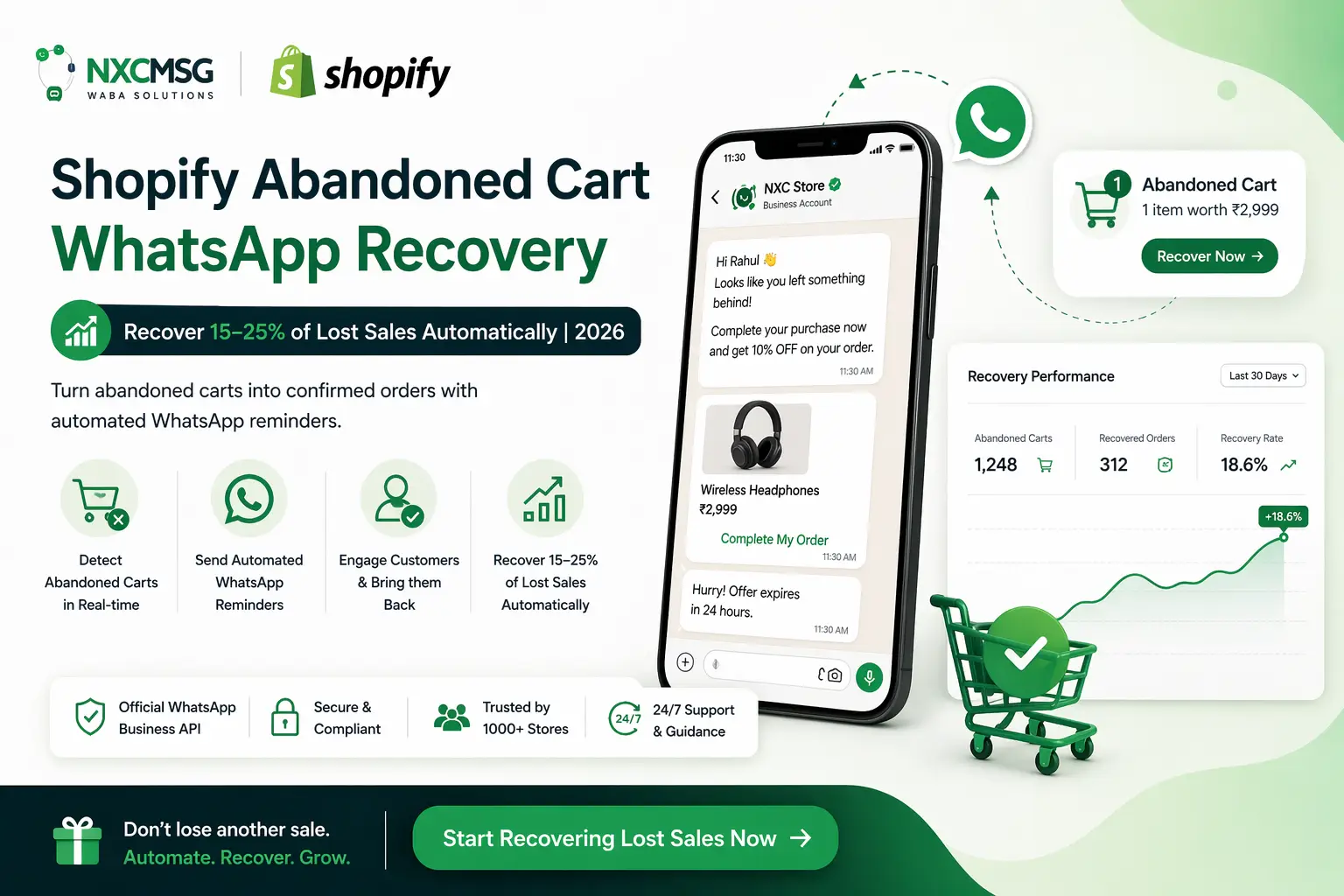
Recover lost sales with Shopify abandoned cart WhatsApp recovery. Learn how to automate reminders, send personalized messages, and win back 15–25% of abandoned carts using WhatsApp Business API. Boost conversions, increase revenue, and improve customer engagement with smart automation in 2026.
🛒 Your Shopify Store’s Monthly Abandoned Cart Loss
68%
of all Indian Shopify shopping carts are abandoned before checkout
On a Shopify store doing ₹5L/month in sales, abandoned carts represent ₹10.6L in lost revenue monthly.
WhatsApp abandoned cart recovery recaptures 15–25% of that — automatically, while you sleep.
WhatsApp abandoned cart recovery recaptures 15–25% of that — automatically, while you sleep.
3%
Email abandoned
cart recovery rate
cart recovery rate
19%
WhatsApp abandoned
cart recovery rate
cart recovery rate
68%average cart abandonment rate on Indian Shopify stores
19%average Shopify cart recovery via WhatsApp (vs 3% email)
98%WhatsApp abandoned cart message open rate within 5 minutes
6.3×more revenue per message vs email abandoned cart campaigns
6 out of 10 customers who add products to your Shopify cart leave without buying. In India, with Cash on Delivery, payment hesitation, and comparison shopping across multiple stores, the abandonment rate is even higher — averaging 68–72%. Shopify’s built-in email abandoned cart recovers 3% of those lost customers. WhatsApp abandoned cart messages via Waba NXC & NXCMSG recover 15–25% — a difference that, for most Indian D2C brands, represents ₹1L–₹10L in recovered revenue every single month.
Why WhatsApp Beats Email for Abandoned Cart Recovery in India
Shopify’s built-in abandoned cart email has one fundamental problem in India: customers don’t check their email the way they check WhatsApp. The average Indian Shopify customer opens email 1–2 times per day — if at all. They open WhatsApp 23–30 times per day. An abandoned cart email sent 2 hours after abandonment reaches the customer when they’re in a completely different context. A WhatsApp arrives on their lock screen, sounds a notification, and gets opened within 5 minutes — while the purchase intent is still alive.
| Metric | Shopify Email Abandoned Cart | WhatsApp Abandoned Cart (Waba NXC) |
|---|---|---|
| Open rate | 18–22% | 95–98% |
| Read within 5 minutes | ~4% | ~80% |
| Cart recovery rate (India) | 2–4% | 15–25% |
| Revenue per 1,000 messages | ₹8,000–15,000 | ₹55,000–1,20,000 |
| Goes to spam/promotions | Yes — often | Never |
| Customer can reply | No (one-way) | Yes — two-way conversation |
| Works for DND numbers | N/A | Yes — not subject to DND |
| Works for COD hesitation | Cannot address objections | Chat resolves objections in real-time |
💸
The ₹ Maths for Your Shopify Store
If your Shopify store does 500 orders/month at ₹1,200 average order value, you’re likely getting 1,100–1,300 abandoned carts. Email recovers ~35 (3%). WhatsApp recovers ~190–260 (17–20%). At ₹1,200 AOV, that’s ₹2.3L–₹3.1L in additional revenue per month from the same traffic you’re already paying to acquire — with zero extra ad spend.
The Perfect Timing for Shopify Abandoned Cart WhatsApp Messages
Timing is the single biggest factor in abandoned cart WhatsApp recovery. Send too early and you interrupt a customer who is still browsing. Send too late and the purchase intent has completely died. Here is how recovery rate drops with time for Indian Shopify stores:
⏰ WhatsApp Abandoned Cart Recovery Rate by Time Sent — India
30–45 min
19–25%
1–2 hours
12–16%
3–6 hours
6–9%
Next day
2–4%
🎯
Optimal Timing: 35 Minutes After Abandonment
The sweet spot for Shopify abandoned cart WhatsApp in India is 35–45 minutes after the customer leaves the checkout. This is long enough for the customer to have genuinely left (not just a slow checkout), but short enough that the product is still top of mind. Waba NXC & NXCMSG triggers the WhatsApp automatically based on Shopify’s abandoned checkout webhook — no manual timing needed.
India-Specific Timing Adjustments
- Evening peak (8–11 PM IST): The highest cart abandonment time for Indian Shopify stores is 8–11 PM when customers are browsing on phone after work. WhatsApp sent at 9:15 PM for a 8:30 PM abandonment is seen immediately and converts at the highest rate.
- Lunch hour (12–2 PM IST): Second highest abandonment window. WhatsApp sent within 40 minutes of lunch-hour abandonment catches customers before they return to work and go into focused mode.
- Never send between 11 PM–7 AM: Configure your Waba NXC setup to suppress WhatsApp cart recovery messages during late-night hours. A 2 AM WhatsApp notification is intrusive and damages brand perception — instead, queue it for 9 AM the next morning.
- COD-specific timing: For Cash on Delivery carts, add a second WhatsApp at 24 hours addressing COD concerns directly — “Payment on delivery is 100% safe. Our courier will collect payment only after you inspect the product.”
3 Proven WhatsApp Abandoned Cart Message Templates for Shopify India
All three templates below need to be created in NXCMSG’s template manager as Marketing category WhatsApp Business API templates and submitted for Meta approval before use. Dynamic variables ({{1}}, {{2}}) are filled automatically by NXCMSG at send time with the customer’s actual name, cart details, and checkout link from Shopify.
🔥 Message 1 — First Recovery
35–45 min after
S
Your Store
Hi Priya! 👋
You left something behind in your cart 🛒
Your items are still saved — but stock is limited. Complete your purchase before they sell out:
🔗 Complete my order
Need help? Just reply to this message!
9:12 PM ✓✓
🛒 Complete My Order
Variables: {{1}} = Customer name · {{2}} = Checkout recovery URL from Shopify
🎁 Message 2 — Offer Nudge
24 hours after
S
Your Store
Priya, we’ve got something for you 🎁
Your cart is still waiting — and we’re adding ₹100 off just for you!
Use code COMEBACK100 at checkout.
🔗 Claim my discount
Offer valid for 24 hours only.
9:15 AM ✓✓
🎁 Claim ₹100 Off
Variables: {{1}} = Name · {{2}} = Discount code · {{3}} = Checkout URL
⏳ Message 3 — Last Chance
48–72 hours after
S
Your Store
Last chance, Priya ⏳
Your cart expires tonight — and items are going fast!
We’ve kept your selection ready, but can’t hold it much longer.
🔗 Complete my order now
Cash on delivery available ✔
6:30 PM ✓✓
⏳ Order Before It’s Gone
Variables: {{1}} = Name · {{2}} = Checkout URL · COD note for high-abandonment stores
📋
Creating These Templates in NXCMSG
Go to wabav2.nxccontrols.in/user/templates → Create Template → Category: Marketing → enter the message body with {{1}} for customer name and {{2}} for checkout URL → Live Preview shows exactly how it looks on WhatsApp → Submit Template. Marketing templates are typically approved in 6–24 hours. Once approved, map it in the Waba NXC Shopify app under Template Mapping → Abandoned Cart.
How to Set Up Shopify Abandoned Cart WhatsApp via Waba NXC & NXCMSG
- Get NXCMSG WhatsApp Business API account
Start your free 14-day trial at waba.nxccontrols.in/pricing. During onboarding, connect your WhatsApp Business number. You need this to get your App Key, Auth Key, and API credentials for the Shopify app.
📞 Free setup call: +91 98079 80778 · No credit card required - Install Waba NXC Shopify app
Go to apps.shopify.com/waba-order-notification-app → click Install → approve permissions. The app registers a webhook listener in your Shopify store for the
⏱ 2 minutes to install · All Shopify planscheckouts/createevent — which fires when a customer adds to cart but does not complete checkout. - Enter API credentials in Shopify Admin
In Shopify Admin → Apps → Waba Chat & Notifications → API Configuration. Enter Waba API URL (
https://waba.nxccontrols.in/), App Key, Auth Key, WhatsApp Number. Add your personal number as Test Phone Number. Save Credentials. - Create your abandoned cart WhatsApp template in NXCMSG
Go to wabav2.nxccontrols.in/user/templates → Create Template → Category: Marketing → write your abandoned cart message with customer name and checkout URL as dynamic variables → submit for Meta approval. Check Live Preview before submitting — it shows exactly how the WhatsApp will look.
⏰ Marketing template approval: typically 6–24 hours - Map template to Abandoned Cart event in the Shopify app
Once the template is approved (Status = Approved in NXCMSG), go back to the Shopify app → Template Mapping → click Refresh Templates → select your approved abandoned cart template from the Abandoned Cart dropdown → click Send Test to verify the WhatsApp arrives on your test phone → click Save Templates.
- Test with a real Shopify abandoned cart
On your Shopify store, add a product to cart from a phone that is NOT your WhatsApp business number → begin checkout but don’t complete → wait 35–45 minutes → verify the WhatsApp arrives on the test phone. If it arrives correctly, your Shopify abandoned cart WhatsApp automation is live.
✅ You’re now recovering carts automatically, 24/7
Do’s and Don’ts for WhatsApp Abandoned Cart Messages
✔ Do This — Higher Recovery Rate
- Personalise with customer’s first name in every message
- Include a direct checkout recovery link from Shopify
- Send first message 35–45 minutes after abandonment
- Mention the specific product or category they left
- Include “Cash on Delivery available” for high-COD stores
- Add a discount code in the 2nd message (24 hrs later)
- Keep message under 120 words — concise converts better
- Test every template before mapping in the Shopify app
- Suppress messages between 11 PM–7 AM IST
✘ Don’t Do This — Kills Recovery Rate
- Send generic message without customer name
- Leave out the checkout recovery link
- Send immediately after abandonment (customer may still be browsing)
- Send at 11 PM–6 AM — intrusive, damages brand
- Use Marketing template for Utility events (wrong category)
- Send more than 3 cart recovery messages — spam risk
- Use emojis that look unprofessional for premium brands
- Send without Meta-approved template — against WhatsApp policy
- Forget to click Refresh Templates after creating new ones in NXCMSG
WhatsApp Abandoned Cart Sequence — 1, 2 & 3 Message Strategy
A single WhatsApp recovers carts well. A properly timed 2–3 message sequence recovers significantly more — addressing different reasons for abandonment at each stage. Here is the exact sequence used by high-revenue Indian Shopify brands with NXCMSG:
| Message | When to Send | Purpose | Discount? | Avg Recovery Contribution |
|---|---|---|---|---|
| Message 1 — Reminder | 35–45 min after abandonment | Remind customer, create mild urgency, provide easy checkout link | No — protect margin | ~65% of total recovered carts |
| Message 2 — Offer | 24 hours after abandonment | Re-engage with incentive for price-sensitive or indecisive customers | Yes — ₹50–150 off or free shipping | ~25% of total recovered carts |
| Message 3 — Last Chance | 48–72 hours after abandonment | Final urgency push for genuinely interested but procrastinating customers | Optional — only if needed | ~10% of total recovered carts |
⚠️
Do Not Send More Than 3 Cart Recovery Messages
Sending 4+ WhatsApp messages for a single abandoned cart is classified as spam and risks your WhatsApp Business API account being flagged by Meta. It also damages customer trust and brand perception. The 3-message sequence above captures 95%+ of recoverable carts — if a customer hasn’t bought after 3 messages, they are not going to buy from this cart. Stop the sequence and re-engage them via a new broadcast campaign after 30+ days.
Case Study: Fashion Store — ₹2.4L Recovered in First 30 Days
Ethnic Wear D2C Brand — Jaipur, Rajasthan
Shopify store · 1,200–1,800 monthly visitors · 71% cart abandonment rate · Waba NXC + NXCMSG
Before NXCMSG: 71% cart abandonment rate. Shopify email cart recovery at 2.8%. On 400 abandoned carts per month at ₹1,800 average order value, email was recovering 11 orders (₹19,800). The remaining ₹7 lakh in abandoned cart value was disappearing monthly.
Setup: Installed Waba NXC Shopify app. Created two WhatsApp templates in NXCMSG — Message 1 (40 min after abandonment, personalised reminder with checkout link) and Message 2 (24 hours later, ₹100 off coupon). Both Meta-approved within 8 hours. Mapped in the Shopify app in 5 minutes.
21%Cart recovery rate (up from 2.8% email)
84Orders recovered per month (was 11)
₹2.4LRevenue recovered in first 30 days
₹3,200Total NXCMSG cost (plan + WhatsApp charges)
“We spent ₹3,200 on NXCMSG and recovered ₹2.4 lakh. The setup took 25 minutes and it runs itself. I still can’t believe we were letting this money walk out the door every month because of email.”— Founder, Ethnic Wear Brand, Jaipur
Case Study: Electronics Accessories Store — 22% Cart Recovery Rate
Mobile Accessories D2C — Bengaluru, Karnataka
Shopify · 3,500+ monthly sessions · High COD ratio (58%) · NXCMSG 3-message sequence
Challenge: Mobile accessories store with 58% COD orders. High abandonment on COD carts because customers compare prices on multiple sites before ordering. Email cart recovery at 3.1%. Average order value ₹650. 800–950 abandoned carts per month.
NXCMSG WhatsApp 3-Message Setup:
- Message 1 (40 min): Personalised reminder — “Your phone accessories are waiting — Cash on Delivery available! Complete your order: [link]”
- Message 2 (24 hrs): “Still thinking? Here’s ₹50 off — use code SAVE50. Valid 24 hours.”
- Message 3 (48 hrs): “Last chance — your cart expires tonight. COD ✔ Free delivery on orders above ₹499 ✔”
22%Overall cart recovery rate across all 3 messages
15%Recovered by Message 1 alone (35 min after abandonment)
35%Reduction in RTO on WhatsApp-recovered COD orders
₹1.1LAverage monthly recovered revenue since setup
“The COD mention in Message 1 was the key for us. Our customers abandon because they’re not sure about online payment. Just reminding them that COD is available in the WhatsApp recovers 15% of carts on its own — before any discount is needed.”— Operations Manager, Mobile Accessories D2C, Bengaluru
🛒 Shopify Abandoned Cart WhatsApp Recovery
Stop Losing ₹1L–₹10L Every Month — Recover Your Shopify Carts on WhatsApp
15–25% cart recovery rate. Automatic 35-minute trigger. 3-message sequence. Personalised WhatsApp with direct checkout link. Works on all Shopify plans. COD-friendly. India-based support. Setup in 30 minutes.
✔Automatic 35-min trigger
✔15–25% recovery rate
✔Personalised with customer name
✔COD mention for Indian stores
✔3-message sequence support
✔Free 14-day trial
+91 98079 80778 · [email protected] · Free setup call · India-based support
Meta-approved BSP · All Shopify plans · INR billing · 99.9% uptime