

Jun 24, 2026
Learn how to create a WhatsApp group link and QR code in under 2 minutes. Step-by-step guide with screenshots for inviting unlimited members instantly.
How to Create a WhatsApp Group Link in 2026 (+ QR Code Guide)
Want to add multiple people to your WhatsApp group without saving contacts one by one? A WhatsApp group invite link is the fastest and easiest solution.
In this complete guide, you’ll learn:
-
How to create a WhatsApp group link (Android & iOS)
-
How to generate a WhatsApp group QR code
-
Best ways to share your group link safelya
-
How to revoke a WhatsApp group link anytime
Time needed: 2 minutes

What Is a WhatsApp Group Link?
A WhatsApp group link is a unique invite URL (for example:
https://chat.whatsapp.com/ABCxyz123) that allows anyone to join your group instantly with one click. It removes the need to manually add contacts and makes group sharing fast and simple.
Key Benefits of WhatsApp Group Invite Links
Add members instantly without saving contacts
Works on Android, iPhone, and desktop
Easy to share via social media or websites
Ideal for events, communities, and marketing groups
How to Create a WhatsApp Group Link (Step-by-Step)
Prerequisites
You must be a group admin.
The WhatsApp group must already exist.
WhatsApp should be updated to the latest version.
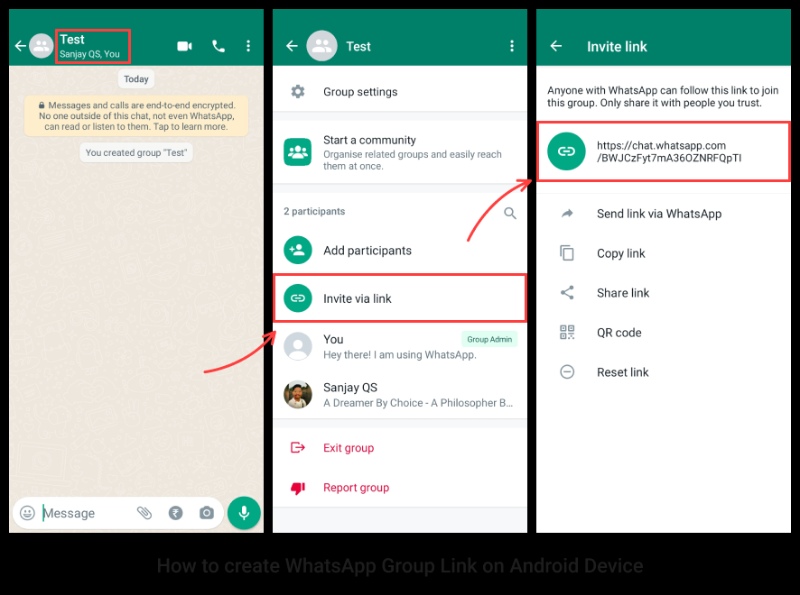
How to Create a WhatsApp Group Link on Android
Open your WhatsApp group.
Tap the group name at the top.
Scroll down and select Invite via link.
Tap Copy link or Share link.
Your WhatsApp group link is now ready to use.
How to Create a WhatsApp Group Link on iPhone (iOS)
Open your WhatsApp group.
Tap the group name.
Tap Invite to Group via Link.
Choose Send Link, Copy Link, or Share Link.
Done! Your group invite link is generated.
How to Create a WhatsApp Group QR Code
WhatsApp also provides a QR code for your group, which is perfect for offline sharing at events or on printed materials.
Steps to Generate WhatsApp Group QR Code
Open the group info page.
Tap Invite via link.
Select QR Code.
Your QR code appears instantly.
How to Share the QR Code
Screenshot and share digitally
Print on posters, flyers, or business cards
Share via email or social media
How People Join Using QR Code
Open WhatsApp, tap the camera icon, and scan the QR code.
Best Ways to Share a WhatsApp Group Link
Direct Messaging
WhatsApp private chats
SMS or text messages
Email campaigns
Social Media Platforms
Instagram bio or Stories
Facebook pages and groups
Twitter (X)
LinkedIn company pages
Website or Blog
Embed your WhatsApp group link using a clear call-to-action button.
Offline Marketing
Event banners
Business cards
Flyers and brochures
Conference displays
How to Revoke a WhatsApp Group Link (Security Guide)
Anyone with your link can join your group. If you want to stop new members, you should revoke the link immediately.
Steps to Revoke WhatsApp Group Link
Open the group.
Tap Group name → Invite via link.
Tap Reset link or Revoke link.
Confirm Revoke.
What Happens After Revoking?
Old link stops working instantly.
Existing members stay in the group.
A new link is generated automatically.
When Should You Revoke a Link?
Spam or unknown users join.
Link was shared publicly by mistake.
Event or campaign has ended.
WhatsApp Group Link Best Practices
Do This
Share links only with trusted users.
Set clear group rules in the description.
Monitor new members regularly.
Revoke links after events.
Avoid This
Posting links on public forums without moderation.
Forgetting to reset links.
Sharing links in competitor groups.
Frequently Asked Questions
Can I create a WhatsApp group link without admin access?
No, only group admins can create invite links.
How many members can join via a group link?
Up to 1,024 members.
Do WhatsApp group links expire?
No, unless you manually revoke them.
Can I see who joined via the link?
No, WhatsApp does not show link-based join history.
Can I create multiple links for one group?
Only one active link exists at a time. Resetting creates a new one.
Conclusion
Creating a WhatsApp group link or QR code takes less than two minutes and saves hours of manual work while making group management effortless.
Quick Recap
Open the group and tap the group name.
Select Invite via link.
Share the link or QR code.
Revoke anytime for security.


