

Jun 24, 2026
Learn how to run Click-to-WhatsApp ads on Facebook and Instagram with this complete 2026 guide by NXCMSG. Discover how to create high-converting ads, connect leads directly to WhatsApp, automate responses, and boost conversions using Meta marketing strategies.
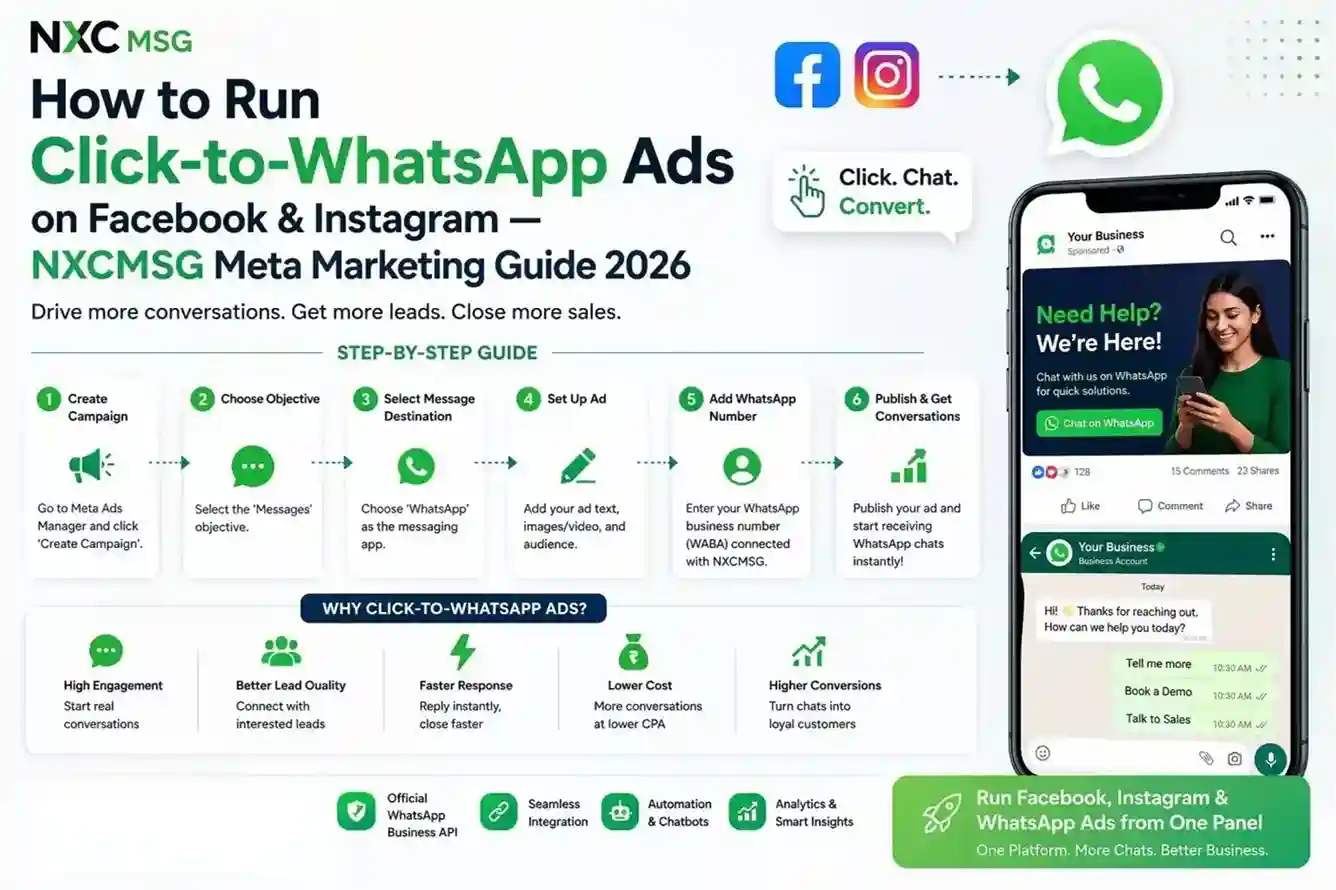
72hfree WhatsApp conversation window per CTWA ad click
3.80%actual CTR on NXCMSG CTWA campaigns (industry avg: 1–2%)
5steps to create & launch a live CTWA campaign in NXCMSG
1dashboard to create, manage, track, and optimise all Meta ads
Click-to-WhatsApp ads are the highest-converting Meta ad format in India — someone clicks your Facebook or Instagram ad and WhatsApp opens instantly. No landing page. No form. No waiting. Just a live conversation. NXCMSG’s Meta Marketing integration lets you create, launch, and track CTWA campaigns entirely from your NXCMSG dashboard — while automatically routing every ad conversation to your team inbox, chatbot flows, and audience segments.
Where to Find Meta Marketing in NXCMSG
Meta Marketing is under Setup → Integrations in the left sidebar, in the Ads & Marketing section. It sits alongside Meta Ads (Lead Ads) — highlighted with a red box in the screenshot below
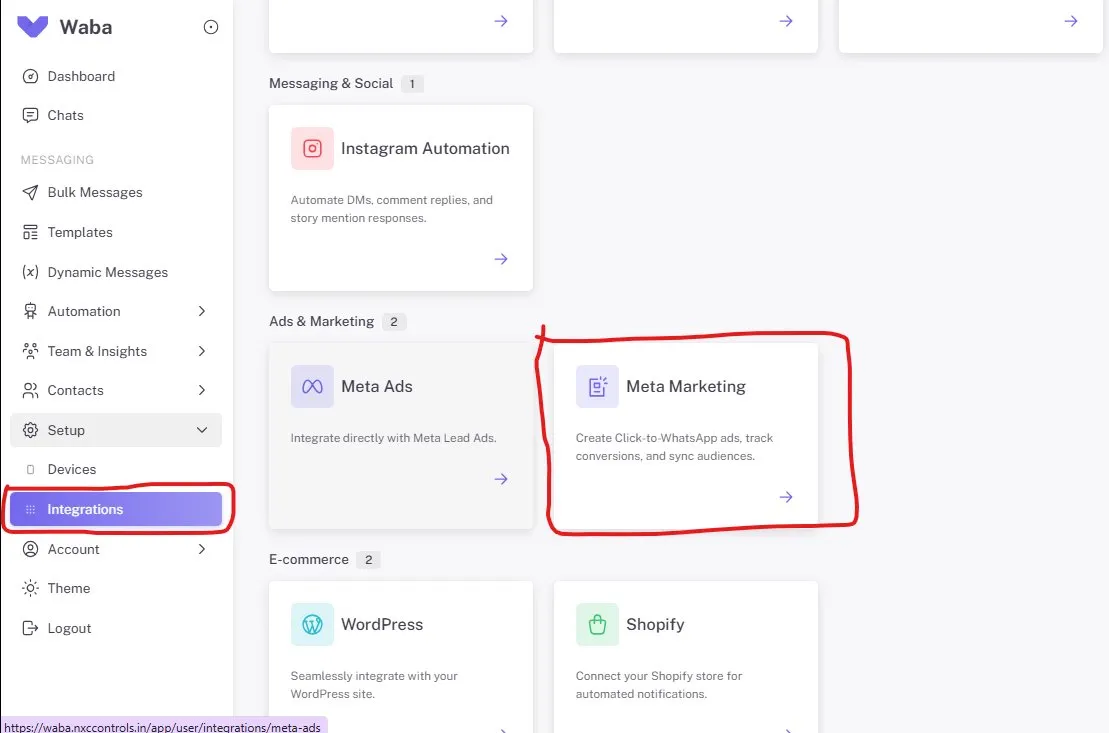
📸 Screenshot 1 — Integrations page: Meta Marketing highlighted in red box in Ads & Marketing section, alongside Meta Ads, WordPress, Shopify
Screenshot: Connection Tab — Account, 10% Fee & WhatsApp Linking
The Connection tab is the first screen after opening Meta Marketing. It shows your Meta account status, linked Ad Account details, total spend, fee rate, and the WhatsApp number linking field required for CTWA ads.
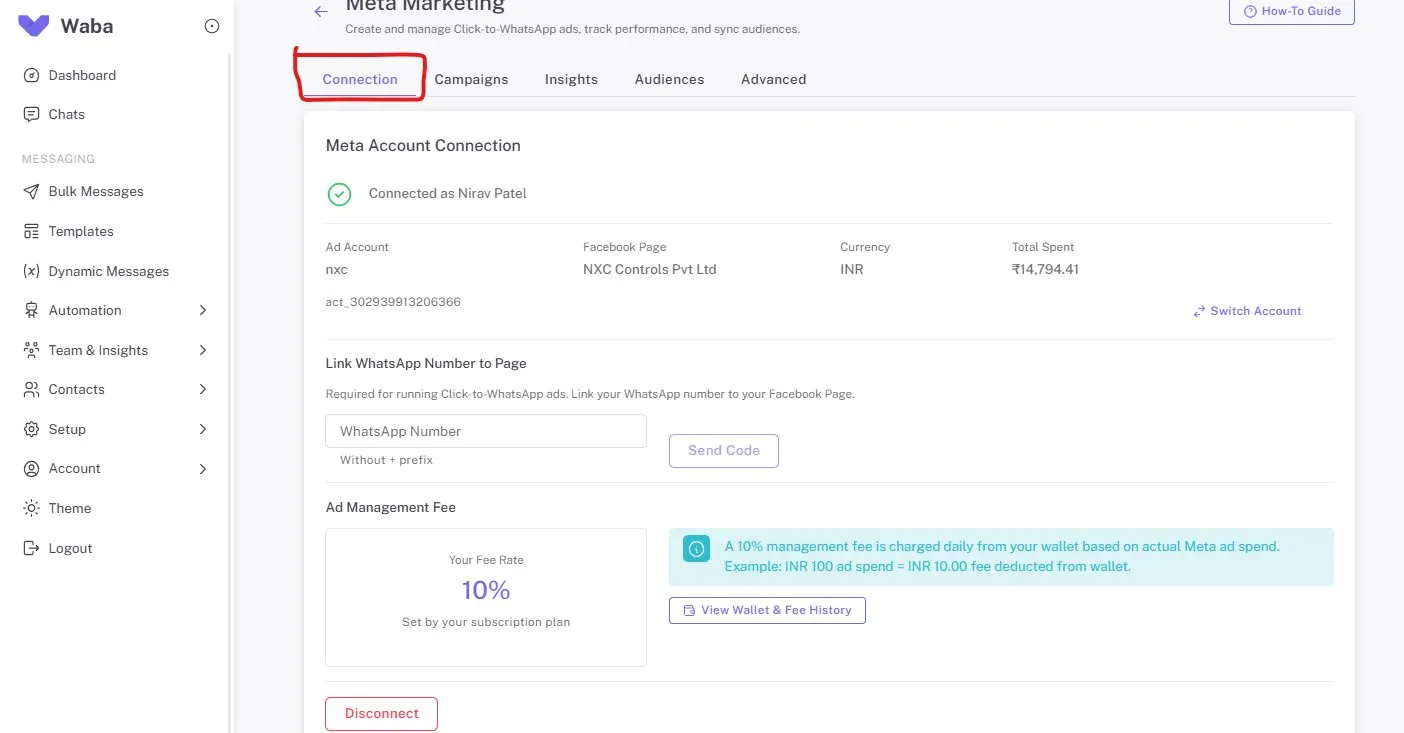
📸 Screenshot 2 — Connection tab: Connected as Nirav Patel · Ad Account: nxc · Page: NXC Controls Pvt Ltd · INR · ₹14,794.41 total spend · Fee Rate: 10% · WhatsApp linking field
💳
How the 10% Fee Works
On a ₹1,000/day campaign: Meta charges ₹1,000 to your ad account’s credit card. NXCMSG deducts ₹100 (10%) from your NXCMSG wallet at 6 AM the next day. Ensure your wallet has sufficient balance. Check all fee transactions at Wallet → Transaction History.
Screenshot: Campaigns Tab — Create & Manage CTWA Campaigns
The Campaigns tab lists all your Click-to-WhatsApp campaigns with their status, objective, budget, and creation date. Click + Create CTWA Campaign to start the 5-step wizard.
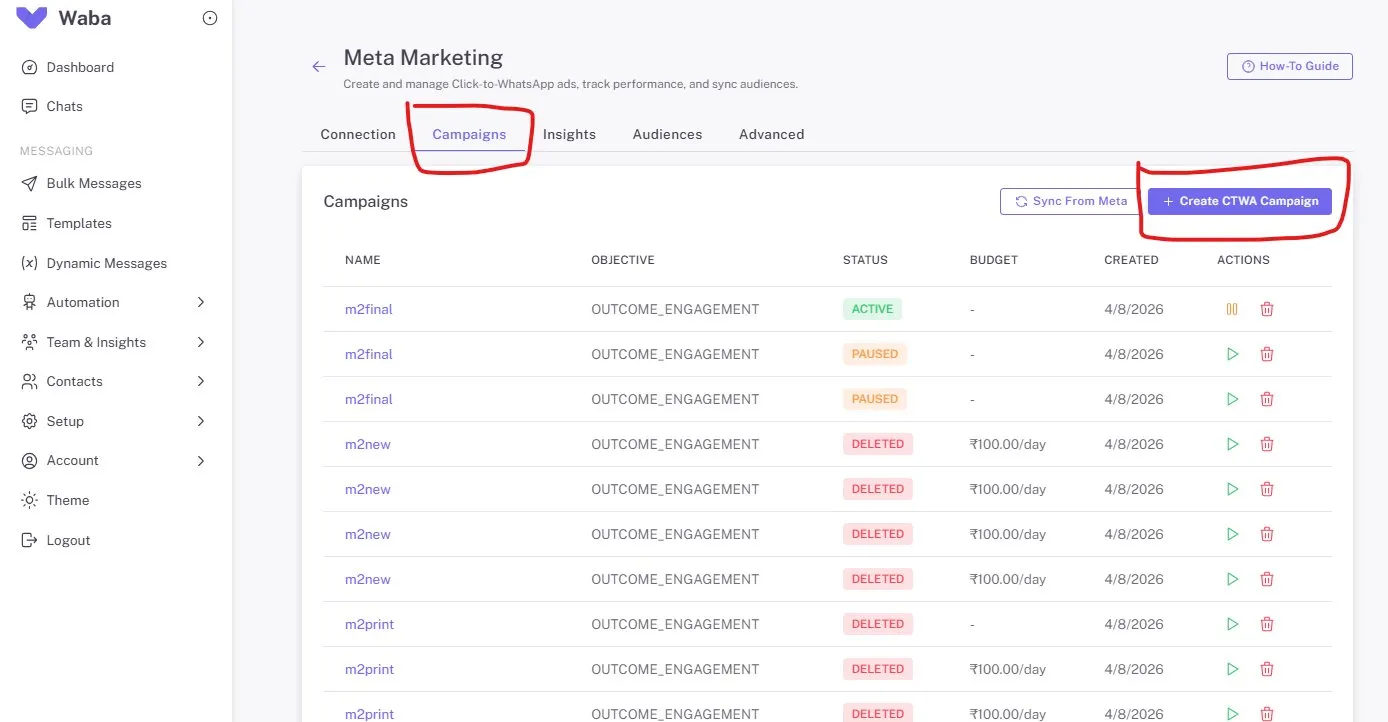
📸 Screenshot 3 — Campaigns tab: m2final (ACTIVE + PAUSED), m2new & m2print (DELETED) · All OUTCOME_ENGAGEMENT · “+ Create CTWA Campaign” button highlighted red
Screenshots: 5-Step Campaign Creation Wizard
Clicking “+ Create CTWA Campaign” opens a step-by-step wizard: Campaign → Audience → Creative → WhatsApp → Review. All inside NXCMSG. Here are all four key steps from your screenshots.
Step 1 — Campaign Details
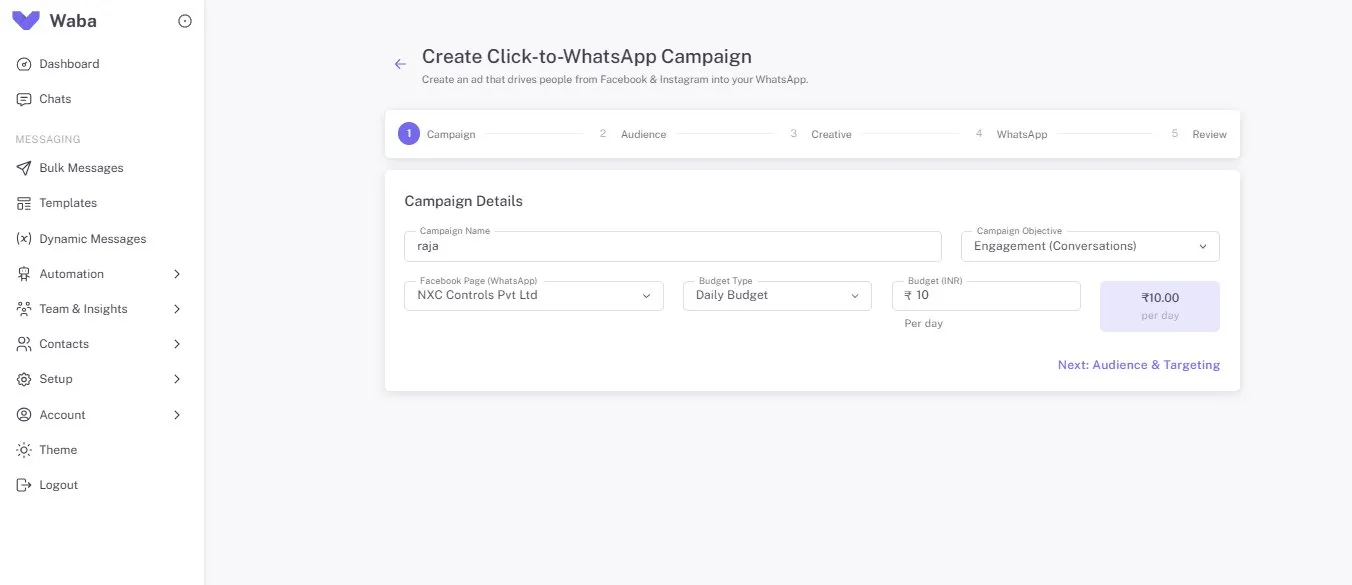
📸 Screenshot 9 — Step 1: Campaign name “raja” · Objective: Engagement (Conversations) · Page: NXC Controls Pvt Ltd · Daily Budget: ₹10
Step 2 — Audience & Targeting
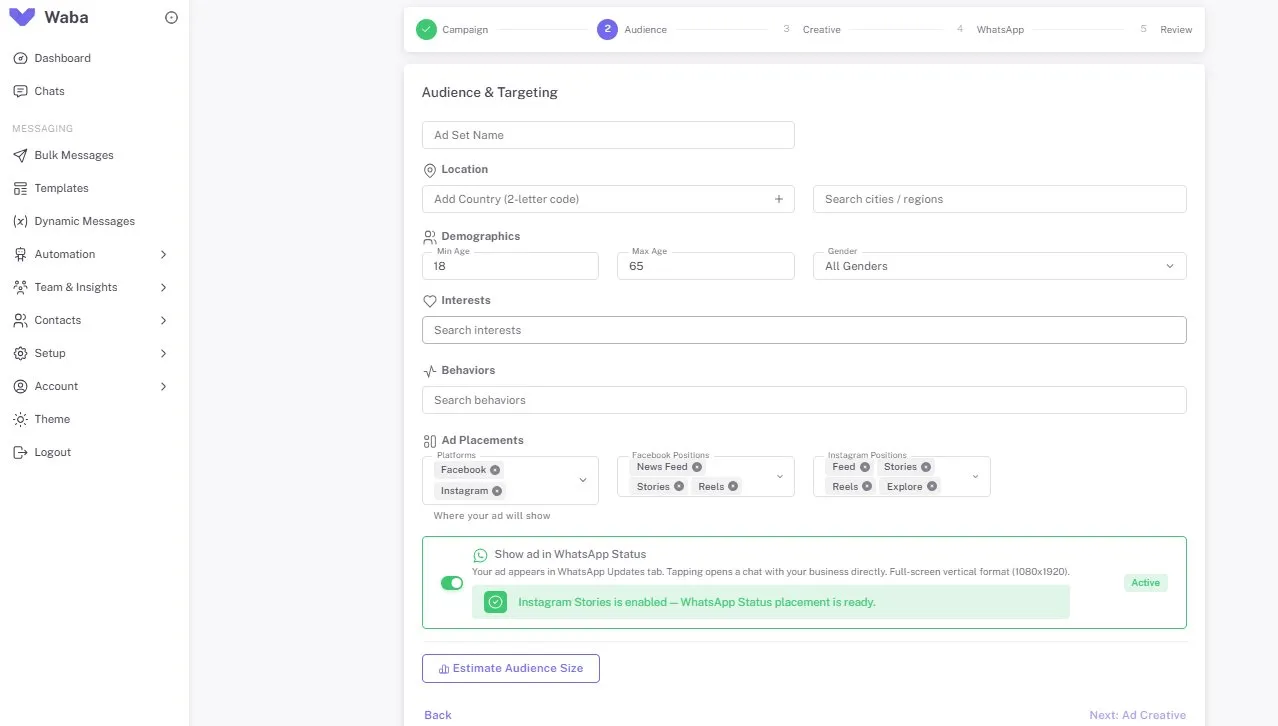
📸 Screenshot 10 — Step 2: Audience — Location, Demographics (18–65, All Genders), Interests, Behaviors, Ad Placements: Facebook + Instagram (News Feed, Stories, Reels, Explore) + WhatsApp Status toggle Active
Step 3 — Ad Creative
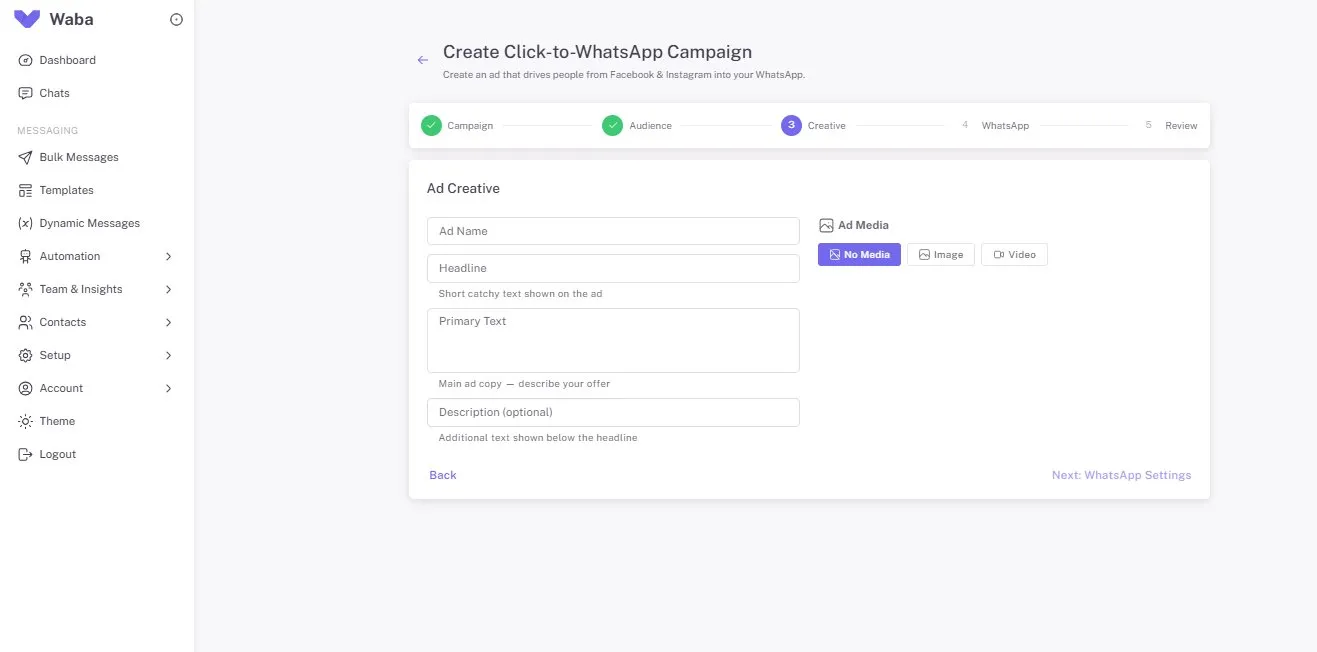
📸 Screenshot 11 — Step 3: Ad Creative — Ad Name, Headline, Primary Text, Description, Ad Media (No Media / Image / Video)
Step 4 — WhatsApp Welcome Experience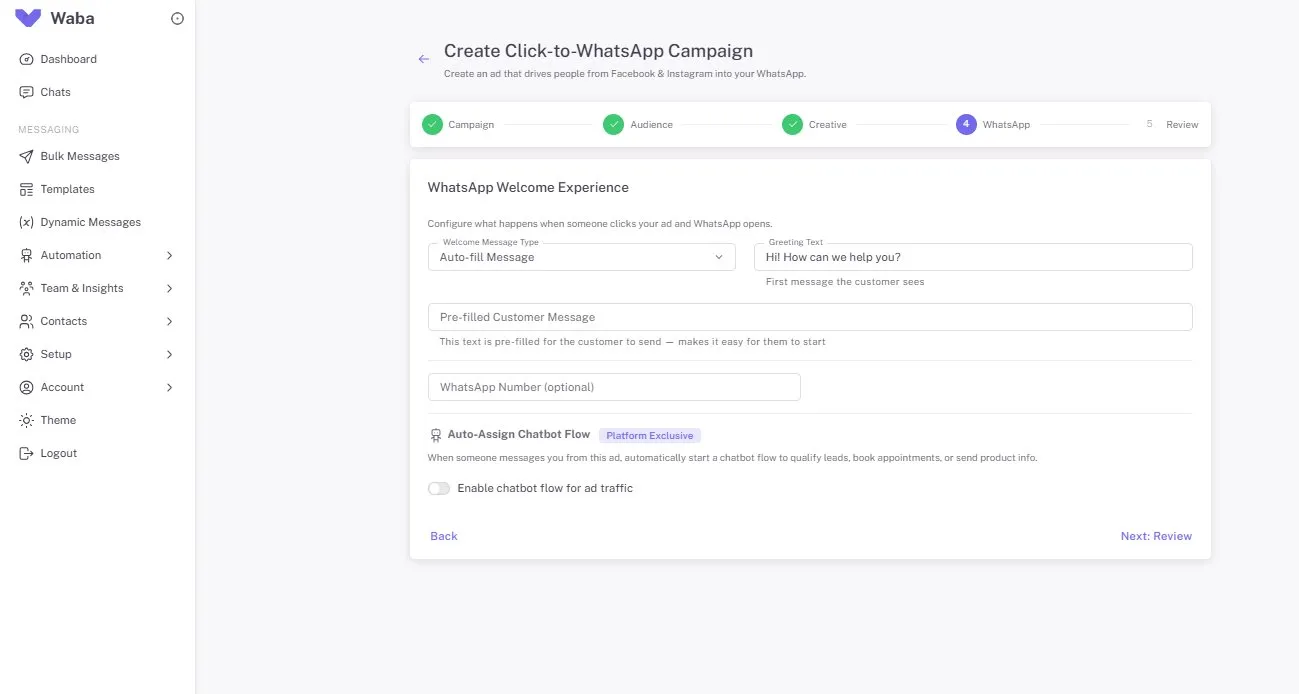
📸 Screenshot 12 — Step 4: WhatsApp Welcome Experience — Auto-fill Message · Greeting: “Hi! How can we help you?” · Pre-filled message · Auto-Assign Chatbot Flow (Platform Exclusive toggle)
🤖
Platform Exclusive — Auto-Assign Chatbot Flow
This feature is unique to NXCMSG — not available in Meta Ads Manager. When someone clicks your CTWA ad, NXCMSG can automatically start a chatbot flow in their WhatsApp — qualifying them, booking an appointment, or sending product info. Enable in Step 4 and every ad conversation is handled automatically 24/7.
Screenshot: Ad Performance Insights — Meta + WhatsApp Combined Data
The Insights tab combines Meta ad metrics (Spend, Impressions, CTR, Clicks) with WhatsApp-specific metrics (Conversations from Ads, Unique Contacts, Conversions) — the only place to see the full funnel in one dashboard.
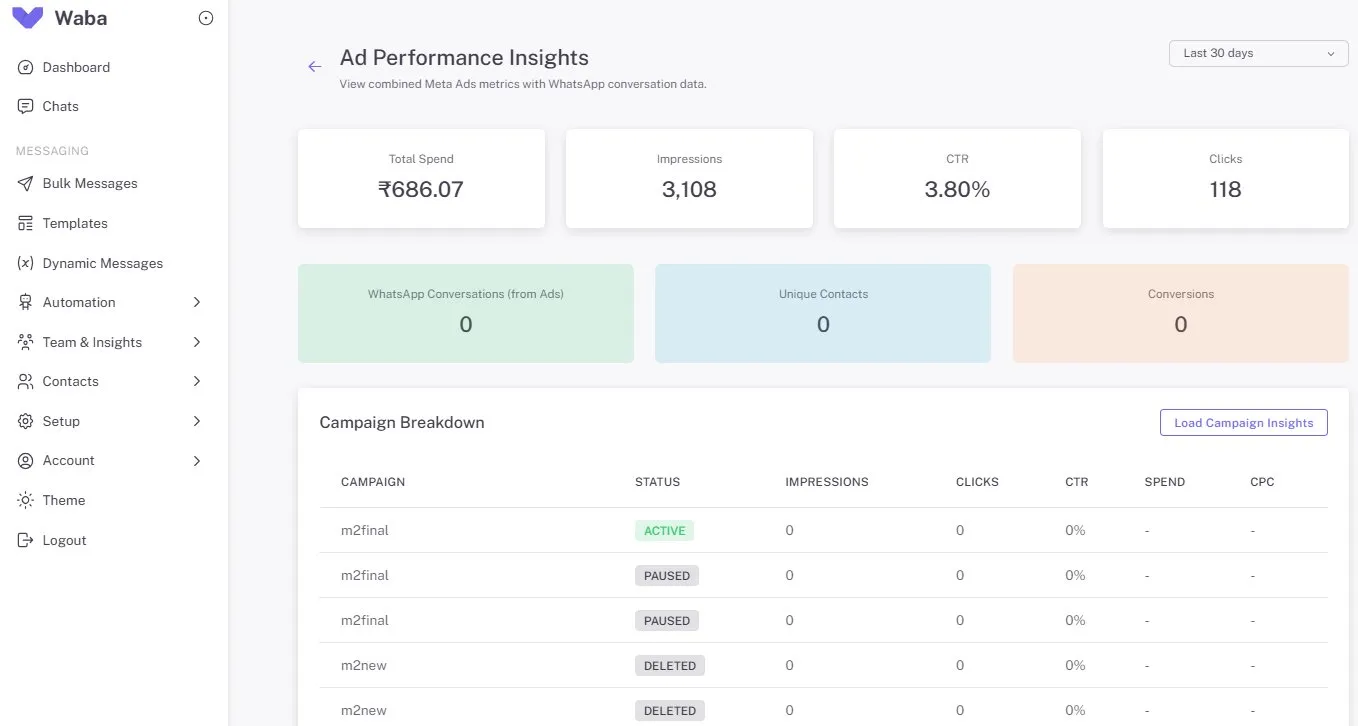
📸 Screenshots 4 & 5 — Insights tab + Ad Performance Insights: Total Spend ₹686.07 · Impressions 3,108 · CTR 3.80% · Clicks 118 · WhatsApp Conversations, Unique Contacts, Conversions · Campaign Breakdown table
Screenshot: Audience Management — Sync WhatsApp Contacts to Meta
The Audiences tab lets you sync NXCMSG WhatsApp contacts as Custom Audiences on Meta for precise ad targeting — including Lookalike Audiences from your best customers.
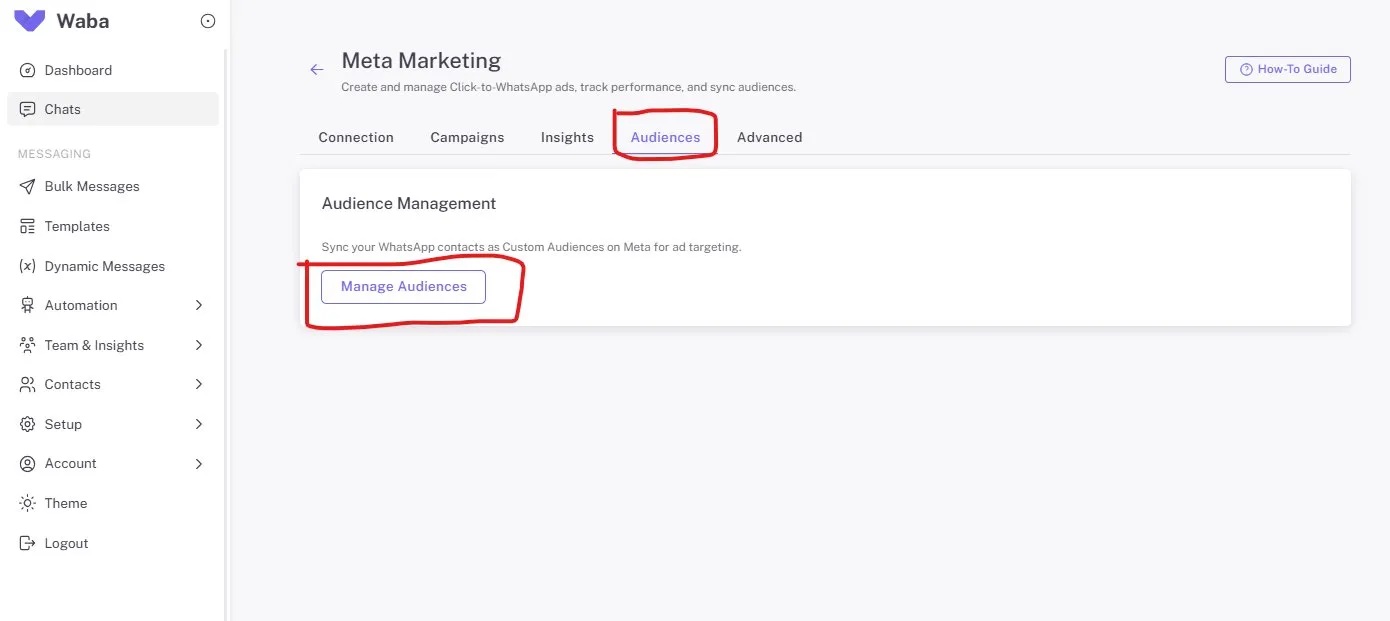
📸 Screenshots 6 & 7 — Audiences tab: Manage Audiences button + Audience Management with 4 options highlighted red: Create Empty Audience, Create From Tag, Create From Group, Create Lookalike
4 Ways to Build Meta Audiences from NXCMSG Contacts
- Create Empty Audience: Start a blank Custom Audience and populate it manually over time.
- Create From Tag: Turn any NXCMSG contact tag (e.g., “VIP”, “Hot-Lead”, “Purchased”) into a Meta Custom Audience for precision retargeting.
- Create From Group: Sync an entire NXCMSG contact group as a Meta Custom Audience — ideal for past customer campaigns.
- Create Lookalike: Meta finds new people similar to your best customers. Upload contacts tagged “Converted” — Meta identifies patterns and finds thousands more like them. Consistently delivers the highest ROAS of any targeting method.
Screenshot: Advanced — Marketing API, Retargeting Engine & A/B Testing
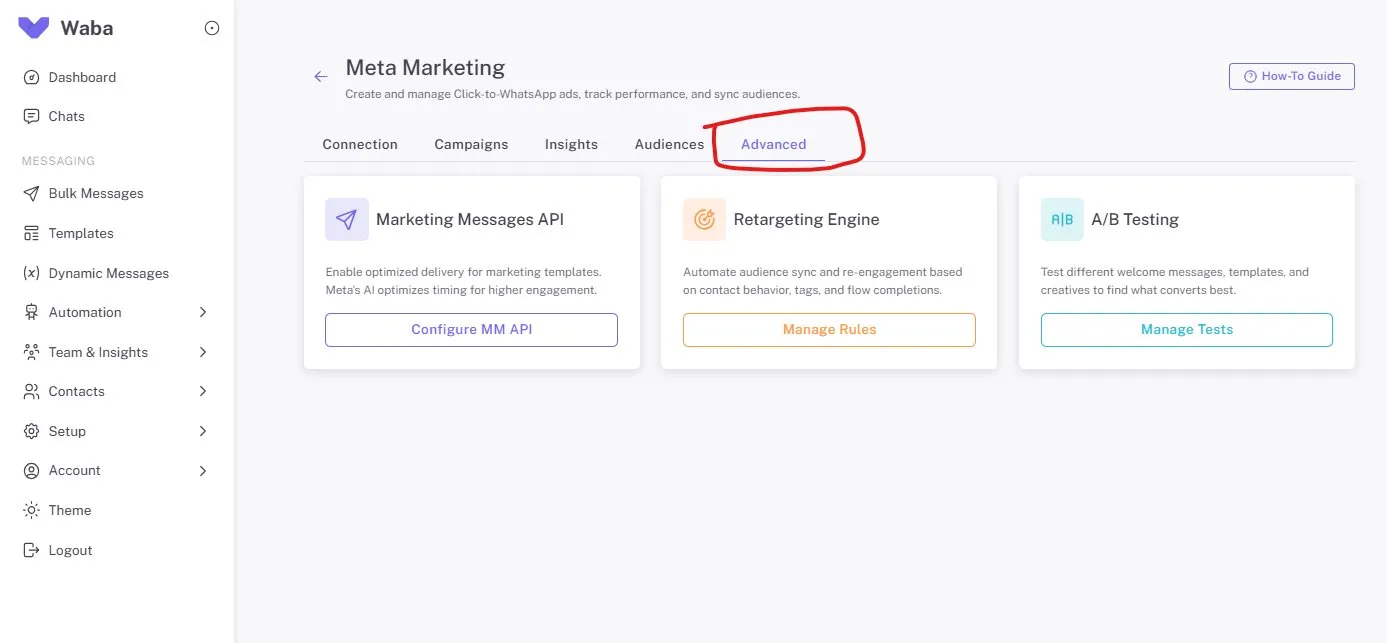
📸 Screenshot 8 — Advanced tab: Marketing Messages API (Configure MM API) · Retargeting Engine (Manage Rules) · A/B Testing (Manage Tests)
How to Launch Your First CTWA Campaign — Step-by-Step
- Go to Integrations → Meta Marketing → Connection tab
Navigate to waba.nxccontrols.in/app/user/integrations/meta-marketing. Click Connect Meta Account → log in with your Facebook Page admin account → allow all permissions.
⚠️ Must be Page admin, not just editor - Link your WhatsApp number to Facebook Page
Enter your WhatsApp number (without + prefix) and click Send Code. Enter the verification code. This one-time step is required to run CTWA ads.
- Go to Campaigns tab → + Create CTWA Campaign
Click the purple + Create CTWA Campaign button to open the 5-step wizard.
- Step 1: Set campaign name, objective, page, and budget
Name your campaign, confirm the objective is “Engagement (Conversations)”, select your Facebook Page, and set a daily budget (minimum ₹10/day). Click Next: Audience & Targeting.
- Step 2: Define your audience
Set location (country + city), demographics (age, gender), interests, behaviors, and ad placements. Enable Show ad in WhatsApp Status for additional free placement. Click Estimate Audience Size to verify reach before proceeding.
- Step 3: Create your ad
Enter Ad Name, Headline, Primary Text, Description. Upload an image or video, or leave as No Media for a text-only ad. Click Next: WhatsApp Settings.
- Step 4: Configure WhatsApp Welcome Experience
Set the Greeting Text (e.g., “Hi! How can we help you?”), add a Pre-filled Customer Message, and optionally enable Auto-Assign Chatbot Flow to automatically start a NXCMSG chatbot flow when someone clicks your ad.
- Step 5: Review and create — then activate
Review all settings and click Create Campaign. The campaign is created as PAUSED. Go to the Campaigns tab, find your campaign, and click ▶ to activate it. Meta reviews the ad (minutes to hours) and then it goes live on Facebook and Instagram.
📞 Need help? Call NXCMSG: +91 98079 80778
Understanding the Billing Model
📘 Meta Ad Spend
- Charged by Meta to your ad account’s payment method (credit card / UPI)
- Based on the daily budget you set in the wizard
- Pause your campaign anytime to stop spending immediately
- Budget shown in INR (₹10 minimum per day)
🔷 NXCMSG Platform Fee (10%)
- 10% of your actual daily Meta ad spend
- Deducted from your NXCMSG wallet daily at 6 AM
- Rate is set by your subscription plan
- View all charges: Wallet → Transaction History
💡 Billing Example — ₹1,000/day Campaign
Daily Meta ad budget₹1,000
Charged to your credit card (by Meta)₹1,000
NXCMSG platform fee (10%)₹100
Deducted from NXCMSG wallet (next day 6 AM)₹100
Total effective cost per day₹1,100
Click-to-WhatsApp Ads vs Standard Facebook Ads
| Metric | Standard Facebook Ads | Click-to-WhatsApp via NXCMSG |
|---|---|---|
| Ad destination | Landing page (avg 78% bounce rate) | Opens WhatsApp directly (0% bounce) |
| Typical CTR | 0.8–1.5% | 2–5% (conversational intent) |
| Response speed | Manual follow-up (hours) | Chatbot responds in seconds |
| Conversation cost | N/A | Free for 72 hours per click |
| Lead qualification | None at ad level | Chatbot qualifies in WhatsApp automatically |
| Audience creation | Separate in Meta Ads Manager | Direct from NXCMSG contacts + tags |
| Performance tracking | Meta metrics only | Meta + WhatsApp conversations combined |
| Retargeting | Manual audience export | Automated via Retargeting Engine |
Case Study: D2C Brand — 4.2× ROAS on CTWA Campaigns
D2C Skincare Brand — Pune
Facebook + Instagram CTWA · ₹500/day budget · 3 active campaigns · NXCMSG Meta Marketing
Problem: Running standard traffic ads to a landing page. CTR: 1.2%. Bounce rate: 78%. Only 4% of ad visitors bought. High spend, poor returns.
CTWA Setup: Switched to 3 CTWA campaigns. Ad click opens WhatsApp instantly — chatbot greets, shows menu, recommends product by skin type, sends payment link. Lookalike audience from “Purchased” contacts. A/B tested greeting messages — second version got 38% more replies.
3.80%CTR (vs 1.2% on landing page ads)
4.2×ROAS (vs 1.8× on landing page)
0%Bounce rate — WhatsApp has none
72hFree conversation window per click
“Same ad budget, 4.2× the revenue. The click opens WhatsApp, chatbot recommends, customer pays — all in one chat.”— Marketing Manager, D2C Skincare Brand, Pune
Case Study: Coaching Institute — ₹12 Cost Per WhatsApp Lead
Professional Coaching Institute — Ahmedabad
₹300/day CTWA budget · 4 courses · Lookalike audiences from NXCMSG contacts
Problem: Facebook Lead Ads costing ₹80–120 per lead. Email follow-up at 18% open rate. Students exploring multiple institutes — needed instant response to win them.
CTWA Setup: Switched to CTWA. Ad click opens WhatsApp with a course menu chatbot. Lookalike from “Enrolled” contacts reduced cost to ₹12 per WhatsApp. Retargeting Engine re-showed ads to non-replies with a free demo offer.
₹12Cost per WhatsApp conversation (vs ₹100 Lead Ad)
58%Reply rate from CTWA clicks
2.8×More demo bookings, same budget
92%Enrollees said WhatsApp chat drove decision
“We went from ₹100 for a lead who forgot submitting the form, to ₹12 for someone actively chatting with us.”— Director of Admissions, Coaching Institute, Ahmedabad
Industry Use Cases — Who Benefits Most from CTWA Ads
Healthcare
CTWA ad → WhatsApp opens → chatbot asks symptom/service → shows doctors → books appointment. Zero form, zero landing page.
Real Estate
Property ad → WhatsApp → chatbot asks budget and city → sends matching listings → books site visit. Retargeting re-engages non-replies.
Education
Course ad → WhatsApp → chatbot presents batch options → books free demo → sends fee structure. Lookalike from enrolled students lowers CPL.
D2C & eCommerce
Product ad → WhatsApp → chatbot recommends by preference → sends product catalogue → payment link. 72-hour free conversation window.
B2B & SaaS
Demo request ad → WhatsApp → chatbot qualifies (company, budget, use case) → assigns to sales rep with full context. No cold calling.
Banking & Finance
Loan ad → WhatsApp → chatbot collects income, city, loan purpose → shows eligibility → advisor takes over. ROAS 3× vs landing page.
Beauty & Wellness
Service ad → WhatsApp → chatbot shows menu → books slot → sends directions. Story mention DM triggers another ad cycle.
Automotive
Car ad → WhatsApp → chatbot asks preferred city → nearest dealer → books test drive. Lookalike from “Test Drive Completed” tags maximises visits.
Frequently Asked Questions
A CTWA ad is a Facebook or Instagram ad where clicking opens WhatsApp directly — no landing page, no form. The user is instantly in a conversation with your business. From the click, a 72-hour free conversation window opens: any messages sent in that window cost nothing (no Meta conversation charges). This is unique to CTWA ads and makes them extremely cost-effective for businesses that close in conversation.
No. The entire CTWA campaign creation, management, and tracking is done inside NXCMSG’s Meta Marketing module — no Meta Ads Manager needed. You connect your Meta account once in the Connection tab, then use the 5-step wizard (Campaign → Audience → Creative → WhatsApp → Review). You can also sync existing Meta Ads Manager campaigns using “Sync From Meta” in the Campaigns tab.
Auto-Assign Chatbot Flow is a Platform Exclusive feature in NXCMSG. When someone clicks your CTWA ad and WhatsApp opens, NXCMSG can automatically start a chatbot flow — greeting the user, showing product/service options, collecting information, booking an appointment, or sending a payment link — all without any human agent involvement. Enable the toggle in Step 4 of campaign creation and select which NXCMSG flow to trigger.
NXCMSG charges 10% of your actual daily Meta ad spend as a platform fee, deducted from your NXCMSG wallet at 6 AM daily. Meta charges your ad spend directly to your credit card linked to the ad account. Example: ₹500 Meta spend → ₹50 deducted from your wallet. Ensure your NXCMSG wallet has sufficient balance. View all deductions at Wallet → Transaction History or click “View Wallet & Fee History” on the Connection tab.
Yes. In Step 2 (Audience & Targeting), the Ad Placements section lets you select both Facebook (News Feed, Stories, Reels) and Instagram (Feed, Stories, Reels, Explore) simultaneously. Additionally, enabling the “Show ad in WhatsApp Status” toggle adds your ad to WhatsApp’s Updates tab as a full-screen vertical ad — automatically activated when Instagram Stories is selected as a placement.
In the Audiences tab, click “Create Lookalike.” Select a source audience — for example, contacts tagged “Converted” or “VIP” in NXCMSG. NXCMSG uploads these contacts to Meta as a Custom Audience, then Meta creates a Lookalike Audience by analysing the patterns of your best customers and finding millions of similar new users. Lookalike audiences consistently deliver the lowest cost per WhatsApp conversation and highest ROAS of any Meta targeting method.
The minimum budget shown in the campaign wizard is ₹10 per day. This covers the Meta ad spend portion. Add 10% for the NXCMSG platform fee (₹1/day at ₹10 budget). For meaningful reach and data, most businesses start at ₹100–500/day. The budget in the wizard is in INR — no currency conversion needed for India-based campaigns.
📡 Run Click-to-WhatsApp Ads from NXCMSG
Create Your First CTWA Campaign — Facebook & Instagram Ads That Open WhatsApp Directly
5-tab dashboard, 5-step wizard, no Ads Manager needed. Campaigns on Facebook, Instagram, and WhatsApp Status from ₹10/day. Chatbot auto-qualification. Lookalike audiences. A/B testing.
✔Click-to-WhatsApp ads
✔Facebook + Instagram + WhatsApp Status
✔72-hour free conversation window
✔Auto-assign chatbot flow
✔Lookalike audiences from contacts
✔A/B testing + retargeting
+91 98079 80778 · [email protected] · Free setup call · India-based support
Meta-approved BSP · Click-to-WhatsApp specialist · INR billing · Onboarding call included


