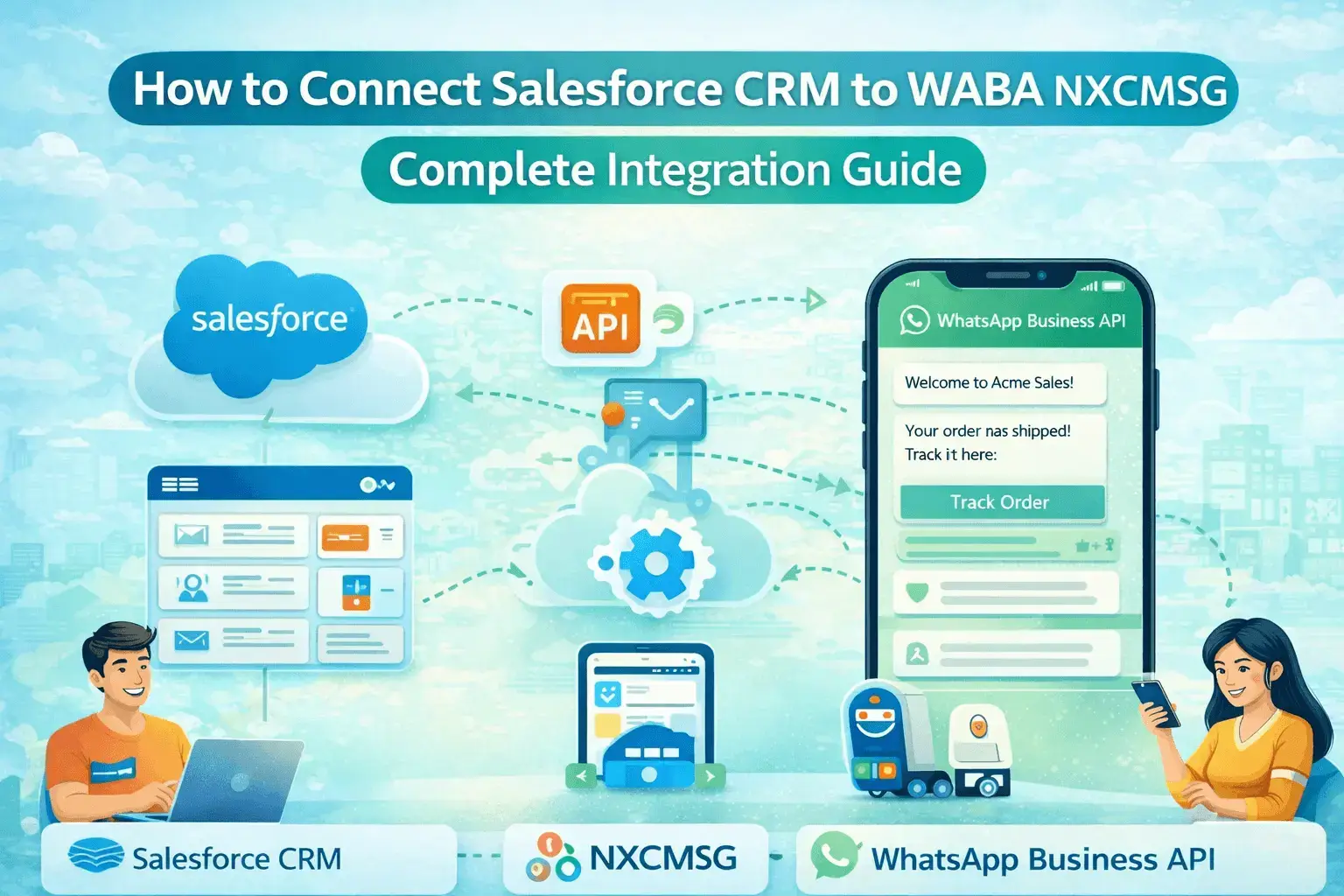
How to Connect Salesforce CRM to WABA NXCMSG — Complete Integration Guide
What is WhatsApp API integration and how does it work in 2026? Complete guide covering setup, features, message types, CRM integration, webhook, pricing and use cases for Indian businesses via WABA NX...
Admin
|
February 23, 2026
|
10 min read
What is WhatsApp API integration and how does it work in 2026? Complete guide covering setup, features, message types, CRM integration, webhook, pricing and use cases for Indian businesses via WABA NXCMSG.
5×higher response on WhatsApp vs Salesforce email sequences
4integration modes: Sync, Pull, Log, and Flow automation
30 minto connect Salesforce and start syncing contacts
1 clickto push any NXCMSG contact directly into Salesforce
Your Salesforce CRM holds every lead, every deal, every customer interaction. WABA NXCMSG is where customers actually respond — instantly, on WhatsApp. The NXCMSG Salesforce integration connects both: sync contacts in one click, pull Salesforce leads into your WhatsApp panel, log every WhatsApp conversation back into Salesforce automatically, and create CRM records directly from chatbot flows. No manual data entry. No switching between tabs.
Step 1 — Where to Find the Salesforce Integration in NXCMSG
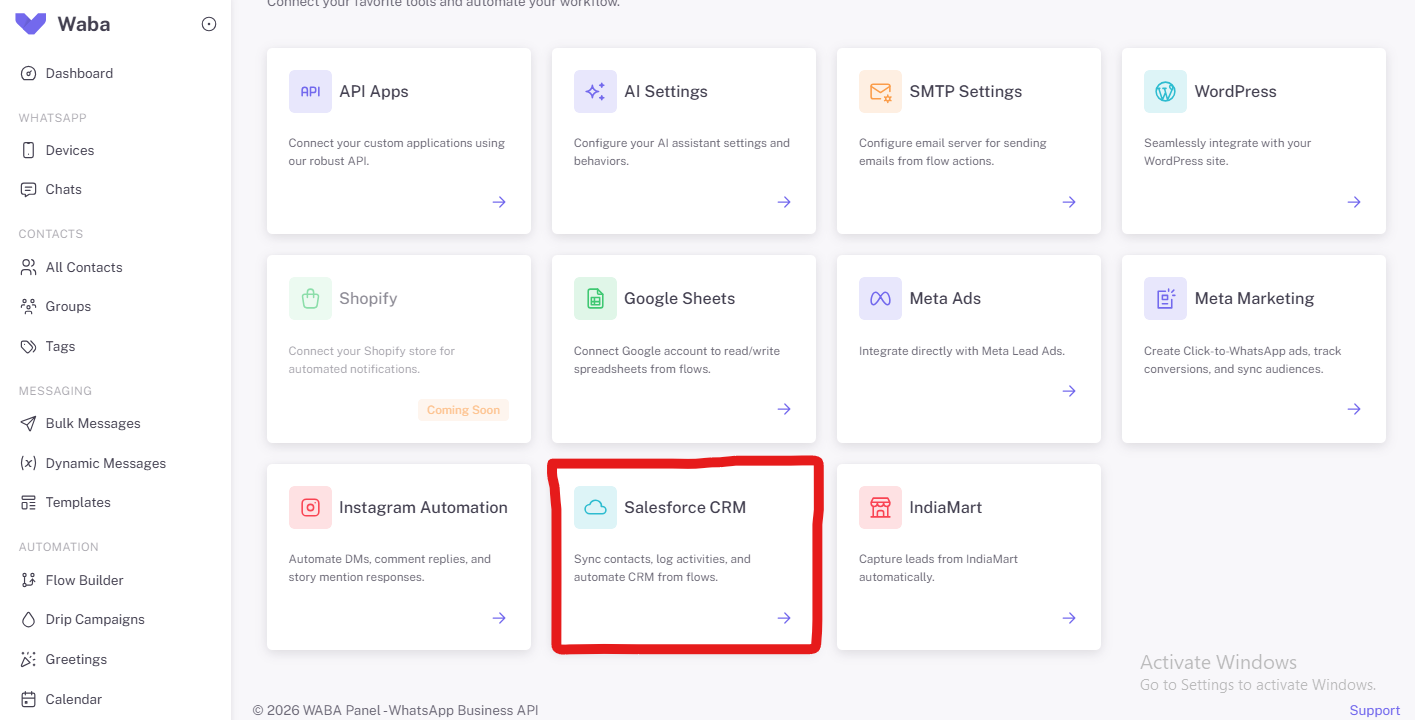
The Salesforce CRM integration is available inside your NXCMSG dashboard under the Integrations section. NXCMSG connects to a wide range of tools — here's exactly where Salesforce sits among all available integrations.
📸 NXCMSG Integrations page — Salesforce CRM highlighted (as shown in your dashboard)
💡
How to Navigate There
In your NXCMSG dashboard, scroll down the left sidebar and clickIntegrations. On the integrations grid, find theSalesforce CRMcard — "Sync contacts, log activities, and automate CRM from flows." Click the → arrow to open the integration page. Direct link: waba.nxccontrols.in/app/user/integrations/salesforce
Step 2 — The Connection Page: 4 Things You Can Do
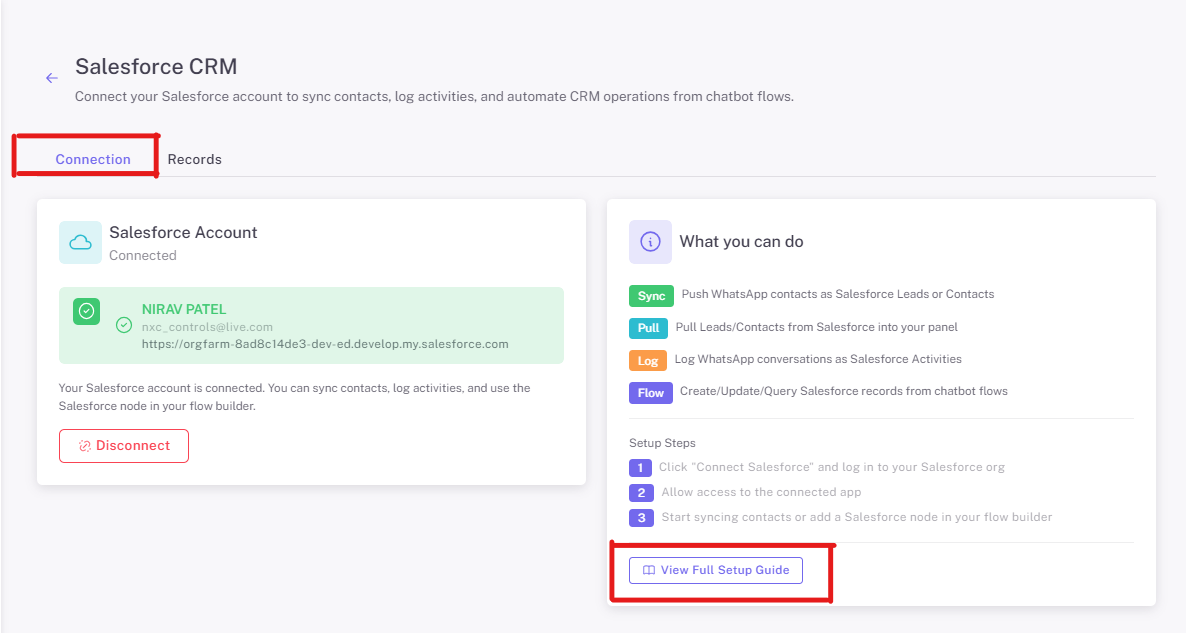
Once you open the Salesforce CRM integration, you see two tabs: Connection and Records. The Connection tab is where you link your Salesforce account and see the four key capabilities the integration unlocks.
Push any WhatsApp contact from NXCMSG into Salesforce as a Lead or Contact — with all their details auto-mapped. One click from the Contacts page.
Pull
Import your existing Salesforce Leads and Contacts directly into the NXCMSG panel — so your sales team can start WhatsApp conversations with CRM leads immediately.
Log
Every WhatsApp conversation is automatically saved as a Salesforce Activity — visible in the Contact or Lead record's timeline. No manual copy-pasting of conversation notes.
Flow
Use the Salesforce node inside NXCMSG's Flow Builder to create, update, or query Salesforce records as part of any automated chatbot conversation — without leaving NXCMSG.
Step 3 — Push WhatsApp Contacts to Salesforce (Bulk Action)
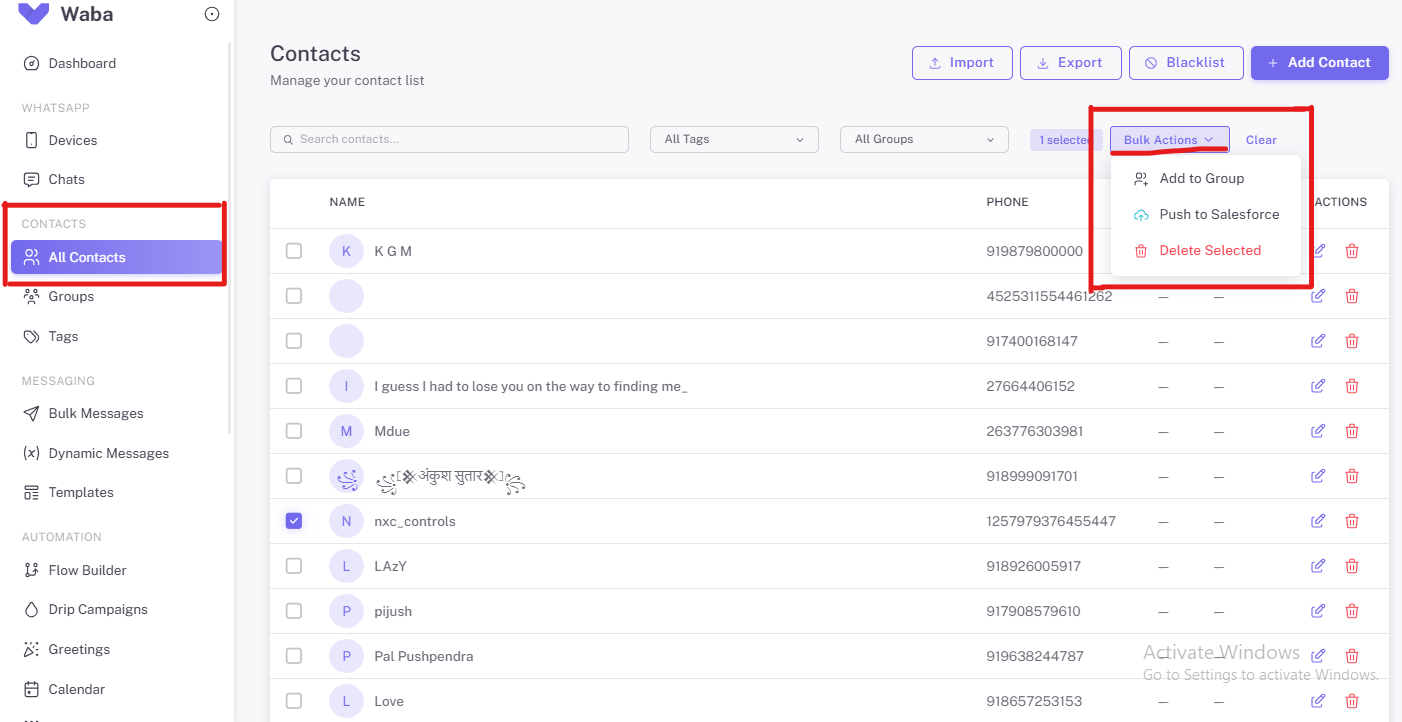
The quickest way to send contacts from NXCMSG into Salesforce is the "Push to Salesforce" bulk action — available right from the Contacts page. Here's the exact flow, matching what you see in the screenshots:
📸 Screenshots 2, 3 & 4 — Contacts page with "Bulk Actions" open showing "Push to Salesforce" option (highlighted with red box in your screenshots)
How to Use "Push to Salesforce" — 7 Steps
• Go toNXCMSG Dashboard →
Contacts → All Contacts
• Use Search, Tags, or Groups to
filter to the contacts you want to push
• Tick the checkbox next to one or
more contacts (the row highlights in blue when selected)
• The action bar shows"1
selected"(or however many you chose) and theBulk Actionsbutton
appears
• ClickBulk Actions ▾to
open the dropdown
• ClickPush to Salesforce—
NXCMSG checks for existing records (no duplicates created) then pushes
• A success count confirms: how
many were created new vs updated in Salesforce
⚠️
No Duplicate Records Created
Before pushing, NXCMSG checks whether a Salesforce Contact or Lead with the same phone number already exists. If found, it updates the existing record instead of creating a new one. Your Salesforce data stays clean.
Step 4 — The Records Tab: View All Salesforce Leads in NXCMSG
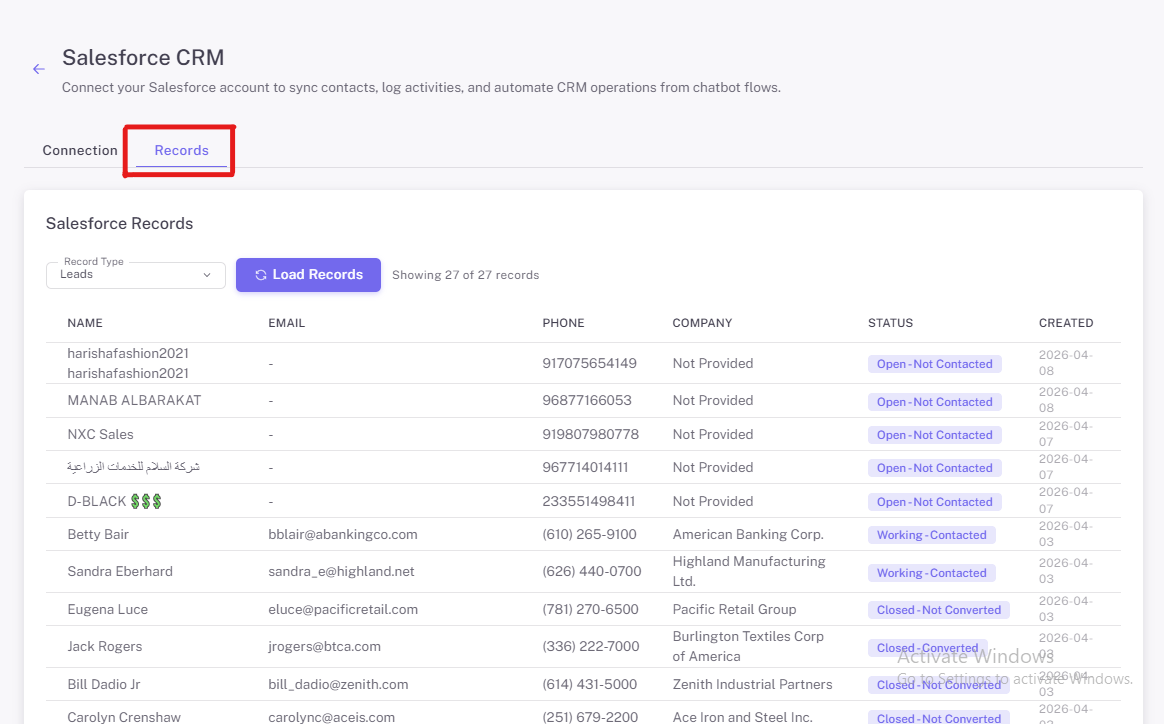
The second tab on the Salesforce integration page is Records. This shows your Salesforce records — Leads or Contacts — pulled directly into the NXCMSG dashboard. No need to log into Salesforce separately to check lead status.
📸 Records tab — Showing 27 Salesforce Leads pulled into NXCMSG with Name, Email, Phone, Company, Status and Created date
What You Can See in the Records Tab
Record Type selector— switch between viewing Leads and Contacts from your Salesforce org
Load Records button— pulls the latest data from Salesforce so you're always seeing current status
Lead status at a glance— Open-Not Contacted, Working-Contacted, Closed-Converted, Closed-Not Converted — all visible without logging into Salesforce
Full contact details— Name, Email, Phone, Company, Status, and Creation date all in one view
27 leads visible— in the screenshot, this account has 27 Salesforce records pulled and ready to view or message directly from NXCMSG
📋
Use the Records Tab to Start WhatsApp Conversations
Once your Salesforce Leads are visible in the Records tab, you can select any lead and initiate a WhatsApp conversation directly from NXCMSG — without going back to Salesforce. The lead's full details (company, phone, status) are visible to your agent as context while they chat.
Setting Up the Integration: 3 Simple Steps
As shown in the Connection page, the setup takes just 3 steps. No developer required. A Salesforce admin and NXCMSG account admin is all you need — the whole process takes about 30 minutes.
Click "Connect Salesforce" and log in to your Salesforce org
On the NXCMSG Salesforce integration page, click the Connect button. You'll be redirected to a Salesforce login screen to authorise the connection using your Salesforce admin account. After approving, you're redirected back to NXCMSG with a "Connected" status — exactly as shown in the Connection page screenshot.
📖 Full step-by-step guide: waba.nxccontrols.in/app/user/integrations/salesforce-guide
Allow access to the connected app
Salesforce will ask you to allow access for NXCMSG's connected app. Approve the requested permissions (read and write access to Contacts, Leads, and Activities). Once approved, your account details appear in the Connection panel — your name, email, and Salesforce org URL are displayed as confirmation.
✅ You'll see your name, email, and Salesforce org URL displayed in the green "Connected" box
Start syncing contacts or add a Salesforce node in your flow builder
You're live. Go to the Records tab to pull your Salesforce Leads into NXCMSG. Go to Contacts to use "Push to Salesforce" on any WhatsApp contact. Or open the Flow Builder and add a Salesforce node to automate CRM record creation from your chatbot conversations.
📞 Need help? Call NXCMSG support: +91 98079 80778
Ready to Connect Your Salesforce to NXCMSG?
Click below to open the integration page directly — it's just 3 steps and 30 minutes to a fully connected CRM + WhatsApp system.
7 Ways Every Team Benefits from Salesforce + NXCMSG
🎯
Sales — Instant Lead Follow-Up
New Salesforce Lead created → WhatsApp message sent within seconds. Reps see CRM details alongside the chat. Push WhatsApp contacts to Salesforce from the Contacts page in one click.
📢
Marketing — CRM-Based Campaigns
Pull a Salesforce Lead segment into NXCMSG, send targeted WhatsApp broadcasts. Opt-outs and replies sync back to Salesforce. No spreadsheet handling, no manual imports.
🤝
Customer Success — Renewals
Renewal date field in Salesforce approaches → NXCMSG sends a WhatsApp conversation opener. CS team sees full account history alongside the chat. Renewals start early, not in the final week.
⭐
Support — Case CSAT
Salesforce Case resolved → WhatsApp CSAT message. Customer replies with a star rating. Rating syncs back to the Salesforce Case record automatically. No separate survey tool needed.
💳
Finance — Payment Reminders
Invoice overdue in Salesforce → WhatsApp reminder with Razorpay payment link. Payment confirmation updates the Opportunity stage. Accounts receivable becomes automated and friction-free.
🤖
Chatbot Flows — CRM Automation
Use the Salesforce Flow node in NXCMSG's Flow Builder to create or update Salesforce records during a chatbot conversation — for example, creating a Lead when a prospect completes a qualification chatbot.
📋
Field Sales — Instant Lead Entry
Field reps collect leads on mobile via NXCMSG conversations, then use "Push to Salesforce" at end of day. All leads appear in Salesforce within minutes — pipeline stays current in real time.
The team had excellent Salesforce data but every outbound touchpoint was email. Email open rate: 22%. Average time for prospects to reply to proposal follow-ups: 3–4 business days. Sales cycle: 45 days average.
What They Set Up
Lead assigned to rep → automatic personalised WhatsApp sent within 30 seconds (via Flow automation)
Opportunity Stage → "Proposal Sent" → WhatsApp follow-up with proposal link sent immediately
Deal stalled for 7+ days → automatic "checking in" WhatsApp from the assigned rep
Closed Won → instant congratulations WhatsApp with onboarding next steps
All WhatsApp replies auto-logged as Activities in Salesforce via the Log feature
Results — First Quarter
40%Faster deal closure (45 → 27 days)
68%Proposal open rate on WhatsApp (vs 22% email)
3.2×More prospect replies per deal
ZeroManual CRM entries for WhatsApp activity
"Our Salesforce data was excellent — we knew everything about our prospects. We just couldn't reach them. Adding WhatsApp triggered directly from Salesforce stage changes was like switching from a bicycle to a car. Same CRM discipline, dramatically different response rates."— VP Sales, B2B HR Tech SaaS, Bangalore
Case Study: Financial Services — 68% Lead Qualification Rate
Leads from Meta ads arrived in Salesforce — but agents were calling each one manually. Call answer rate: 34%. Only 22% of those who answered qualified as genuine prospects. Lead-to-qualified ratio: under 8%.
The NXCMSG + Salesforce Setup
New Salesforce Lead created → NXCMSG immediately sends a qualification WhatsApp to the lead's mobile number
NXCMSG chatbot handles 4-step qualification in WhatsApp — responses pushed back to Salesforce custom fields via the Flow node
Qualified lead → Salesforce Lead Status auto-updates → agent assigned in NXCMSG and notified in the shared inbox
Agent opens NXCMSG and sees the full WhatsApp conversation + Salesforce Lead details without any tab-switching
Results — 90 Days
68%Lead qualification rate (up from 8%)
4.2 minTime to first contact (down from 4.5 hours)
62%Reduction in manual calling
₹12LMonthly new premium from WhatsApp channel
"We were calling 100 leads to get 8 qualified prospects. Now the NXCMSG chatbot qualifies 68 out of 100 before an agent is involved. Our agents only talk to people who already want to buy — and the full WhatsApp conversation history is in Salesforce before the call starts."— Head of Digital Sales, Insurance Broker, Mumbai
Frequently Asked Questions
🔗 Connect Your CRM to NXCMSG Today
Salesforce + WABA NXCMSG — Your CRM Finally Reaches Your Customers
Sync, Pull, Log, and Flow — 4 ways to connect your Salesforce data to WhatsApp. Set up in 30 minutes. No developer needed. Start with a 14-day free trial.
✔Sync contacts in 1 click✔Pull Salesforce Leads into NXCMSG✔Auto-log conversations to Salesforce✔Flow Builder Salesforce node✔14-day free trial